Learning Kubernetes
What is Kubernetes?
Official definition would look like this:
Kubernetes is an open-source platform designed to automate the deployment, scaling, and operation of containerized applications. It allows you to manage clusters of hosts running containers, providing mechanisms for deployment, maintenance, and scaling of applications. Kubernetes is widely used for its ability to simplify the management of complex applications by automating many of the processes involved in running containers, such as load balancing, scheduling, and resource management.
In short, it handles load balancing and keeps the specified containers alive.
It is really useful in big infrastructures with a lot of containers. So…
Why would I want to learn it?
I am currently working as Junior DevOps, so naturally I would want to learn more about potential deployment and scalability options.
But what else Kubernetes can offer?
As every person that uses GNU/Linux (I use Arch BTW) I have a home server (that is also used as my testing environment). And setting up the environment for every project manually can get tedious, so that’s why I use Docker, but having multiple projects at once or not cleaning up after one project can get messy really quickly (not to mention upgrading versions of the project).
So why not use the solution for automating all of this?
How?
Before installing the real thing on the server it would be helpful to test it locally on one machine to not worry about networking.
Fortunately Kubernetes provides virtual environment to play with, it’s called “Minikube” and it comes with extensive documentation.
To start the Minikube and be able to easily use commands (exacly like in k8) I’ve used these commands:
minikube start
alias kubectl="minikube kubectl --"
minikube dashboard
(I’ve replaced Minikube dashboard with Lens later, but is good enough for start.)
Environment ready to go, so what should I do with it? The best way to learn something is to use it for your own. That’s why I’ve used use one of my projects QCheckServ. It is a sysadmin monitoring tool to observe status of servers resources usage.
And to increase number of pods I’ve added few simple elements:
- API connected with Google Chat to send alert messages
- Heartbeat checker that requests the
/heartbeatroute of the QCheckServ every minute - Postgres database for testing purposes
I’ve created Dockerfiles for every part (besides Postgres for which I will be using official docker image)
Dockerfiles
# QCheckServ
FROM python:3.11-slim

ENV FLASK_APP run.py

COPY run.py gunicorn-cfg.py requirements.txt create_db.py ./
COPY qcheckserv qcheckserv

RUN pip install -r requirements.txt
RUN apt update && apt -y install libpq-dev gcc && pip install psycopg2

EXPOSE 7010
CMD ["gunicorn", "--config", "gunicorn-cfg.py", "run:app"]
# Google chat alerts
FROM python:3.11-slim-bullseye

ENV FLASK_APP run.py

COPY run.py gunicorn-cfg.py requirements.txt ./
COPY googleChatAlerts googleChatAlerts

RUN pip install -r requirements.txt

RUN flask -A googleChatAlerts cmd boot

CMD ["gunicorn", "--config", "gunicorn-cfg.py", "run:app"]
# Heartbeat checker
FROM python:3.12-slim

ENV PYTHONUNBUFFERED=0

WORKDIR /app

COPY . .

RUN pip install -r requirements.txt

CMD python3 heartbeat_checker.py
Everything ready…
Then how it should be deployed?
QCheckServ is the most important part of this application, it is the core of the structure. It needs to be always available to handle constant data streams from other servers.
# QCheckServ Deployment
apiVersion: apps/v1
kind: Deployment
metadata:
  name: qcheckserv-deployment
  labels:
    app: qcheckserv
spec:
  replicas: 3
  selector:
    matchLabels:
      app: qcheckserv
  template:
    metadata:
      labels:
        app: qcheckserv
    spec:
      containers:
      - name: qcheckserv
        image: qcheckserv:latest
        imagePullPolicy: IfNotPresent
I’ve created the deployment and tried to apply it:
kubectl apply -f ./deploy_qcheckserv.yml
And it went through, but then failed during creation of the pod:
Failed to pull image “qcheckserv:latest”: Error response from daemon: pull access denied for qcheckserv, repository does not exist or may require ‘docker login’: denied: requested access to the resource is denied
This error is raised, because I’ve built image for my local docker and not in Minikube environment. After quick search I’ve found out that I need to execute:
eval $(minikube docker-env)
and then build all local images in this environment. This could be avoided if I used local repository with ssl (but I’ve destroyed mine a few days earlier).
(Some tutorials use official images that avoid this issue entirely, and it can be hard to understand why is it trying to pull the image if it is stated in the config that it should do it only if it is not present.)
Google Chat Bot should always reposnse as it can be accessed by other sources and it sends critical information that needs to be always delivered.
# Google Alert Bot Deployment
apiVersion: apps/v1
kind: Deployment
metadata:
  name: google-alert-bot-deployment
  labels:
    app.kubernetes.io/name: kubernetes-testing
    app.kubernetes.io/instance: kubernetes-testing-instance
    app: google-alert-bot
spec:
  replicas: 2
  selector:
    matchLabels:
      app: google-alert-bot
  template:
    metadata:
      labels:
        app: google-alert-bot
    spec:
      containers:
      - name: google-alerts-bot-flask
        image: google-chat-alerts:latest
        imagePullPolicy: IfNotPresent
        ports:
        - containerPort: 6010
This time all went smoothly without issues after applying the config:
kubectl apply -f ./deploy-google-alert.yml
Heartbeat checker is a simple request in a loop. It does not need to be constantly up, but can be just restarted if needed.
# Heartbeat Checker Deployment
apiVersion: apps/v1
kind: Deployment
metadata:
  name: heartbeat-checker-deployment
spec:
  replicas: 1
  selector:
    matchLabels:
      app: heartbeat-checker
  template:
    metadata:
      labels:
        app: heartbeat-checker
    spec:
      containers:
      - name: heartbeat-checker
        image: heartbeat-checker:latest
        imagePullPolicy: IfNotPresent
Again config applied without issues (at least with deployment…)
kubectl apply -f ./deploy-heartbeat-checker.yml
Postgres in this case is just a test database and will be replaced with Postgres that is on barebone server.
# Postgresql Deployment
apiVersion: apps/v1
kind: Deployment
metadata:
  name: postgres-deployment
  labels:
    app: db-test
spec:
  replicas: 1
  selector:
    matchLabels:
      app: db-test
  template:
    metadata:
      labels:
        app: db-test
    spec:
      containers:
      - name: db-test
        image: postgres:16
        imagePullPolicy: IfNotPresent
        ports:
        - containerPort: 5432
Everything is up and running, but I did not check if it is working as intended. To test it I’ve removed deployment of QCheckServ as it should trigger the Heartbeat Checker and send message to Google Chat.
kubectl delete qcheckserv-deployment
But it did not happen… In logs of Heartbeat Checker I could see errors related to timeouts, but not of the QCheckServ but to the Google Chat Bot. Pods could not communicate between each other without…
Services
Services allow communication between containers using the service name.
For this project I’ve needed:
- Heartbeat checker to see QCheckServ and Google Chat Bot
- QCheckServ to see testing Postgres So I’ve created services for those 3 elements:
# Service QCheckServ
apiVersion: v1
kind: Service
metadata:
  name: qcheckserv
  labels:
    app.kubernetes.io/name: kubernetes-testing
    app.kubernetes.io/instance: kubernetes-testing-instance
spec:
  selector:
    app: qcheckserv
  ports:
    - protocol: TCP
      port: 7010
      targetPort: 7010
# Service Testing DB
apiVersion: v1
kind: Service
metadata:
  name: db-test
  labels:
    app.kubernetes.io/name: kubernetes-testing
    app.kubernetes.io/instance: kubernetes-testing-instance
spec:
  selector:
    app: db-test
  ports:
    - protocol: TCP
      port: 5432
      targetPort: 5432
# Service Google Alert Bot
apiVersion: v1
kind: Service
metadata:
  name: google-chat-alerts-flask
  labels:
    app.kubernetes.io/name: kubernetes-testing
    app.kubernetes.io/instance: kubernetes-testing-instance
spec:
  selector:
    app: google-alert-bot
  ports:
    - protocol: TCP
      port: 6010
      targetPort: 6010
kubectl apply -f service-qcheckserv.yml
kubectl apply -f service-google-alert-bot.yml
kubectl apply -f service-postgres-testing.yml
After applying the changes I’ve changed code of the Heartbeat Checker and QCheckServ to use names of the services and making rolling update of the deployments I’ve tried again to disable QCheckServ and see logs of the Heartbeat Checker. Success! It is working correctly and sending messages to Google Chat!
It works, but changing code for every application to control the heartbeat or changing the connection of Postgres database does not seem like the best idea.
ConfigMap and Secrets
I’ve created ConfigMap defining urls for checking heartbeat:
# ConfigMap for testing
apiVersion: v1
data:
  HEARTBEAT_URL: "http://qcheckserv:7010/heartbeat"
  HEARTBEAT_ALERT_URL: "http://google-chat-alerts-flask:6010/heartbeat"
kind: ConfigMap
metadata:
  name: testing-config
  namespace: default
And to use ConfigMap I’ve needed to change the deployment of Heartbeat Checker and define variables used by the app inside:
...
        env:
          - name: HEARTBEAT_URL
            valueFrom:
              configMapKeyRef:
                name: testing-config
                key: HEARTBEAT_URL
          - name: HEARTBEAT_ALERT_URL
            valueFrom:
              configMapKeyRef:
                name: testing-config
                key: HEARTBEAT_ALERT_URL
For secrets (that should not be stored in file) I’ve used command to define Postgres username, password and jdbc link:
minikube kubectl -- create secret generic postgres-user-creds \
    --from-literal=DB_USER=postgres\
    --from-literal=DB_PASSWORD=super_secret_password\
    --from-literal=DB_NAME=db-test\
    --from-literal=TESTING_POSTGRES_JDBC=postgresql://postgres:super_secret_password@db-test/db-test
And edited out Postgres and QCheckServ config:
# Postgresql Deployment
...
        env:
          - name: POSTGRES_USER
            valueFrom:
              secretKeyRef:
                name: postgres-user-creds
                key: DB_USER
          - name: POSTGRES_PASSWORD
            valueFrom:
              secretKeyRef:
                name: postgres-user-creds
                key: DB_PASSWORD
          - name: POSTGRES_DB
            valueFrom:
              secretKeyRef:
                name: postgres-user-creds
                key: DB_NAME
# QCheckServ Deployment
        env:
          - name: QCHECKSERV_SECRET_KEY
            valueFrom:
              secretKeyRef:
                name: postgres-user-creds
                key: DB_PASSWORD
          - name: QCHECKSERV_DATABASE_URL
            valueFrom:
              secretKeyRef:
                name: postgres-user-creds
                key: TESTING_POSTGRES_JDBC
As the most of the apps loads the env variables at the start of the execution I’ve restarted Minikube to use less commands and restart all deployments. Then I’ve discovered that Postgres pod did not have persistent storage configured…
Persistent Storage
So to not lose data again I’ve created persistent storage claim
# DB Persistent Volume Claim
apiVersion: v1
kind: PersistentVolumeClaim
metadata:
  name: db-test-pv-claim
  labels:
    app: kubernetes-testing
spec:
  accessModes:
    - ReadWriteOnce
  resources:
    requests:
      storage: 5Gi
and updated the Postgres deployment:
# Postgres Deployment
...
        volumeMounts:
        - name: db-test-persistent-storage
          mountPath: /var/lib/postgresql/data
      volumes:
      - name: db-test-persistent-storage
        persistentVolumeClaim:
          claimName: db-test-pv-claim
Exposing Minikube to localhost
And at the end I’ve exposed each service and tested them.
minikube service qcheckserv-service
Tried to log in, try to add alert etc.
minikube service db-test
Connected to Postgres by psql and checked the database structure:
psql -h localhost -p 40633 -U postgres
minikube service google-chat-alerts-flask
Send few curls to see if the messages are sent correctly:
curl 127.0.0.1:43519/heartbeat/0
Resource management
During the development and testing Minikube dashboard started to seem a little bit underwhelming and I’ve tried to search for better alternatives, where I’ve found Lens.
I’ve installed it, connected to the cluster and configured prometheus:
yay -S lens-bin helm
helm repo add stable https://prometheus-community.github.io/helm-charts
helm repo update
helm install prometheus prometheus-community/prometheus
(There are paid versions of Lens, but there is not really a need for it. Lens Pricing Plans)
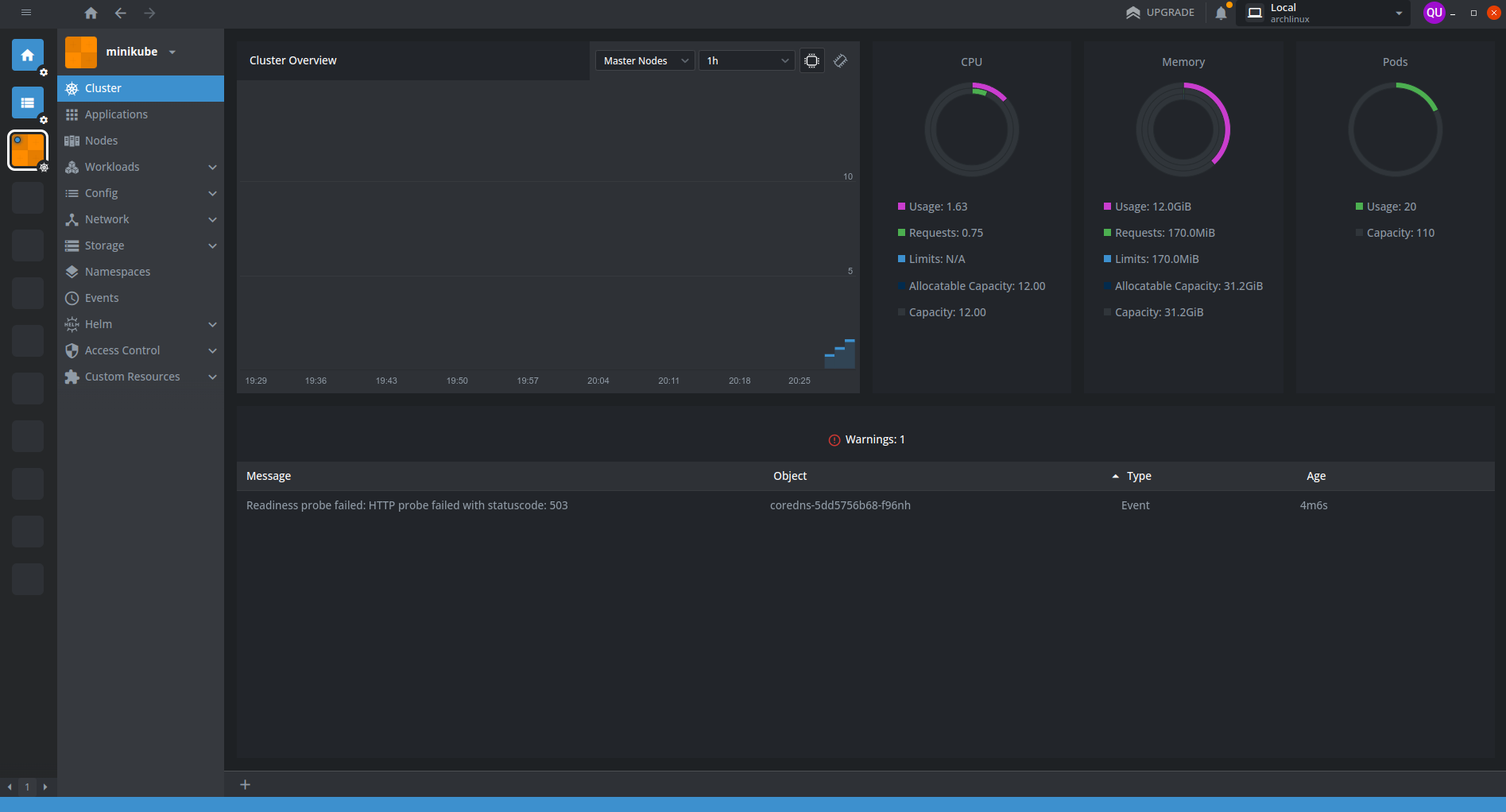
(Sometimes when Minikube starts it can send error message related to DNS)
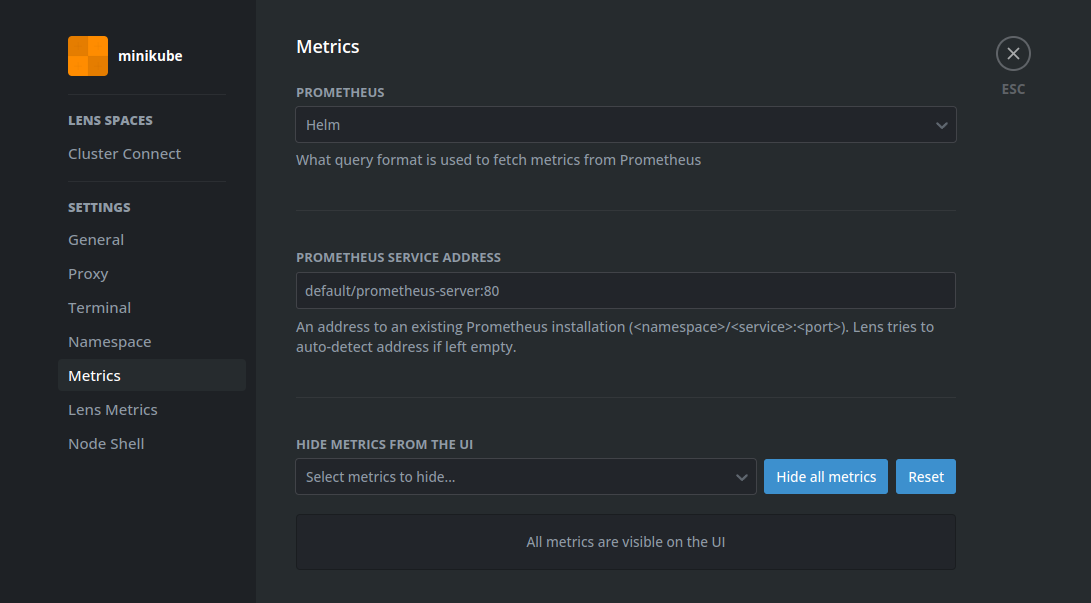
After installing prometheus I’ve noticed that in Applications tab only prometheus is visible and after quick research I’ve added labels to all my config files this:
    app.kubernetes.io/name: kubernetes-testing
    app.kubernetes.io/instance: kubernetes-testing-instance
It allowed me to get to every pod I was interested in and quickly find issues when they occurred.
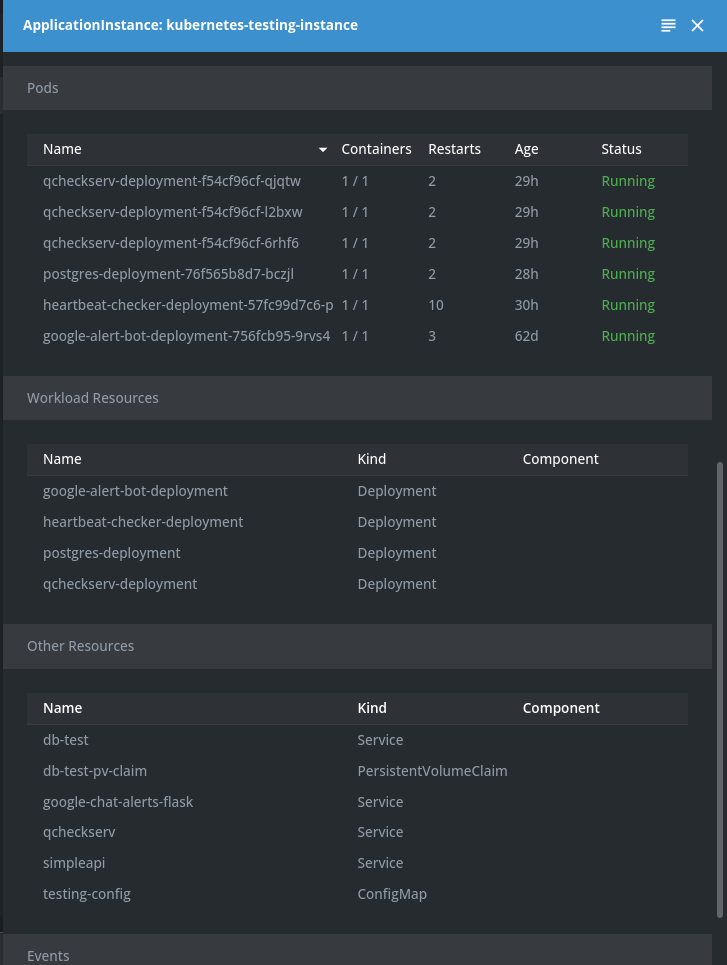
Lens helped massively when I’ve needed to restart cluster or update it by allowing to click just one button and whole deployment could be updated, and I did not need to remember the name of the deployment or where the config file is.
Useful commands
minikube dashboard # start dashboard with kubernetes status
minikube service <name-of-service> # expose service to localhost machine
kubectl get deployments # get list of deployments
kubectl get services # get list of services
kubectl apply -f <path> # apply configuration from file
kubectl delete deployment <name> # remove deployment by name
kubectl delete service <name> # remove service by name
Final version of config files
Final version of all files
# QCheckServ Deployment
apiVersion: apps/v1
kind: Deployment
metadata:
  name: qcheckserv-deployment
  labels:
    app.kubernetes.io/name: kubernetes-testing
    app.kubernetes.io/instance: kubernetes-testing-instance
    app: qcheckserv
spec:
  replicas: 3
  selector:
    matchLabels:
      app: qcheckserv
  template:
    metadata:
      labels:
        app: qcheckserv
    spec:
      containers:
      - name: qcheckserv
        image: qcheckserv:latest
        imagePullPolicy: IfNotPresent
        ports:
        - containerPort: 7010
        env:
          - name: QCHECKSERV_SECRET_KEY
            valueFrom:
              secretKeyRef:
                name: postgres-user-creds
                key: DB_PASSWORD
          - name: QCHECKSERV_DATABASE_URL
            valueFrom:
              secretKeyRef:
                name: postgres-user-creds
                key: TESTING_POSTGRES_JDBC
# Heartbeat Checker Deployment
apiVersion: apps/v1
kind: Deployment
metadata:
  name: heartbeat-checker-deployment
  labels:
    app.kubernetes.io/name: kubernetes-testing
    app.kubernetes.io/instance: kubernetes-testing-instance
spec:
  replicas: 1
  selector:
    matchLabels:
      app: heartbeat-checker
  template:
    metadata:
      labels:
        app: heartbeat-checker
    spec:
      containers:
      - name: heartbeat-checker
        image: heartbeat-checker:latest
        imagePullPolicy: IfNotPresent
        env:
          - name: HEARTBEAT_URL
            valueFrom:
              configMapKeyRef:
                name: testing-config
                key: HEARTBEAT_URL
          - name: HEARTBEAT_ALERT_URL
            valueFrom:
              configMapKeyRef:
                name: testing-config
                key: HEARTBEAT_ALERT_URL
# Google Alert Bot Deployment
apiVersion: apps/v1
kind: Deployment
metadata:
  name: google-alert-bot-deployment
  labels:
    app.kubernetes.io/name: kubernetes-testing
    app.kubernetes.io/instance: kubernetes-testing-instance
    app: google-alert-bot
spec:
  replicas: 1
  selector:
    matchLabels:
      app: google-alert-bot
  template:
    metadata:
      labels:
        app: google-alert-bot
    spec:
      containers:
      - name: google-alerts-bot-flask
        image: google-chat-alerts:latest
        imagePullPolicy: IfNotPresent
        ports:
        - containerPort: 6010
# Postgresql Deployment
apiVersion: apps/v1
kind: Deployment
metadata:
  name: postgres-deployment
  labels:
    app.kubernetes.io/name: kubernetes-testing
    app.kubernetes.io/instance: kubernetes-testing-instance
    app: db-test
spec:
  replicas: 1
  selector:
    matchLabels:
      app: db-test
  template:
    metadata:
      labels:
        app: db-test
    spec:
      containers:
      - name: db-test
        image: postgres:16
        imagePullPolicy: IfNotPresent
        ports:
        - containerPort: 5432
        env:
          - name: POSTGRES_USER
            valueFrom:
              secretKeyRef:
                name: postgres-user-creds
                key: DB_USER
          - name: POSTGRES_PASSWORD
            valueFrom:
              secretKeyRef:
                name: postgres-user-creds
                key: DB_PASSWORD
          - name: POSTGRES_DB
            valueFrom:
              secretKeyRef:
                name: postgres-user-creds
                key: DB_NAME
        volumeMounts:
        - name: db-test-persistent-storage
          mountPath: /var/lib/postgresql/data
      volumes:
      - name: db-test-persistent-storage
        persistentVolumeClaim:
          claimName: db-test-pv-claim
# Service Google Alert Bot
apiVersion: v1
kind: Service
metadata:
  name: google-chat-alerts-flask
  labels:
    app.kubernetes.io/name: kubernetes-testing
    app.kubernetes.io/instance: kubernetes-testing-instance
spec:
  selector:
    app: google-alert-bot
  ports:
    - protocol: TCP
      port: 6010
      targetPort: 6010
# Service Testing DB
apiVersion: v1
kind: Service
metadata:
  name: db-test
  labels:
    app.kubernetes.io/name: kubernetes-testing
    app.kubernetes.io/instance: kubernetes-testing-instance
spec:
  selector:
    app: db-test
  ports:
    - protocol: TCP
      port: 5432
      targetPort: 5432
# Service QCheckServ
apiVersion: v1
kind: Service
metadata:
  name: qcheckserv
  labels:
    app.kubernetes.io/name: kubernetes-testing
    app.kubernetes.io/instance: kubernetes-testing-instance
spec:
  selector:
    app: qcheckserv
  ports:
    - protocol: TCP
      port: 7010
      targetPort: 7010
# ConfigMap for testing
apiVersion: v1
data:
  HEARTBEAT_URL: "http://qcheckserv:7010/heartbeat"
  HEARTBEAT_ALERT_URL: "http://google-chat-alerts-flask:6010/heartbeat"
kind: ConfigMap
metadata:
  name: testing-config
  namespace: default
  labels:
    app.kubernetes.io/name: kubernetes-testing
    app.kubernetes.io/instance: kubernetes-testing-instance
# DB Persistent Volume Claim
apiVersion: v1
kind: PersistentVolumeClaim
metadata:
  name: db-test-pv-claim
  labels:
    app: kubernetes-testing
    app.kubernetes.io/name: kubernetes-testing
    app.kubernetes.io/instance: kubernetes-testing-instance
spec:
  accessModes:
    - ReadWriteOnce
  resources:
    requests:
      storage: 5Gi
## Command for creating secret

minikube kubectl -- create secret generic postgres-user-creds \
    --from-literal=DB_USER=postgres\
    --from-literal=DB_PASSWORD=super_secret_password\
    --from-literal=DB_NAME=db-test\
    --from-literal=TESTING_POSTGRES_JDBC=postgresql://postgres:super_secret_password@db-test/db-test
Links
- https://kubernetes.io/docs/home/
- https://kubernetes.io/docs/tutorials/hello-minikube/
- https://opensource.com/article/19/6/introduction-kubernetes-secrets-and-configmaps
- https://kubernetes.io/docs/tutorials/kubernetes-basics/update/update-intro/
- https://docs.docker.com/language/python/containerize/
- https://stackoverflow.com/questions/29663459/why-doesnt-python-app-print-anything-when-run-in-a-detached-docker-container
- https://hub.docker.com/_/postgres/
- https://kubernetes.io/docs/tutorials/kubernetes-basics/expose/expose-intro/
- https://minikube.sigs.k8s.io/docs/handbook/persistent_volumes/
- https://www.digitalocean.com/community/tutorials/how-to-deploy-postgres-to-kubernetes-cluster
- https://github.com/Quar15/QCheckServ